· 2 min read
One sentence in, one architecture diagram out
I gave Claude Code one sentence about a web stack and got an architecture diagram back, with the real logos. I tested stack-diagram, an open-source skill. How it works, what went wrong and what to check before you install it.
I gave Claude Code one sentence about a web stack and got this diagram back, with the real logos. It took two renders and a few minutes.
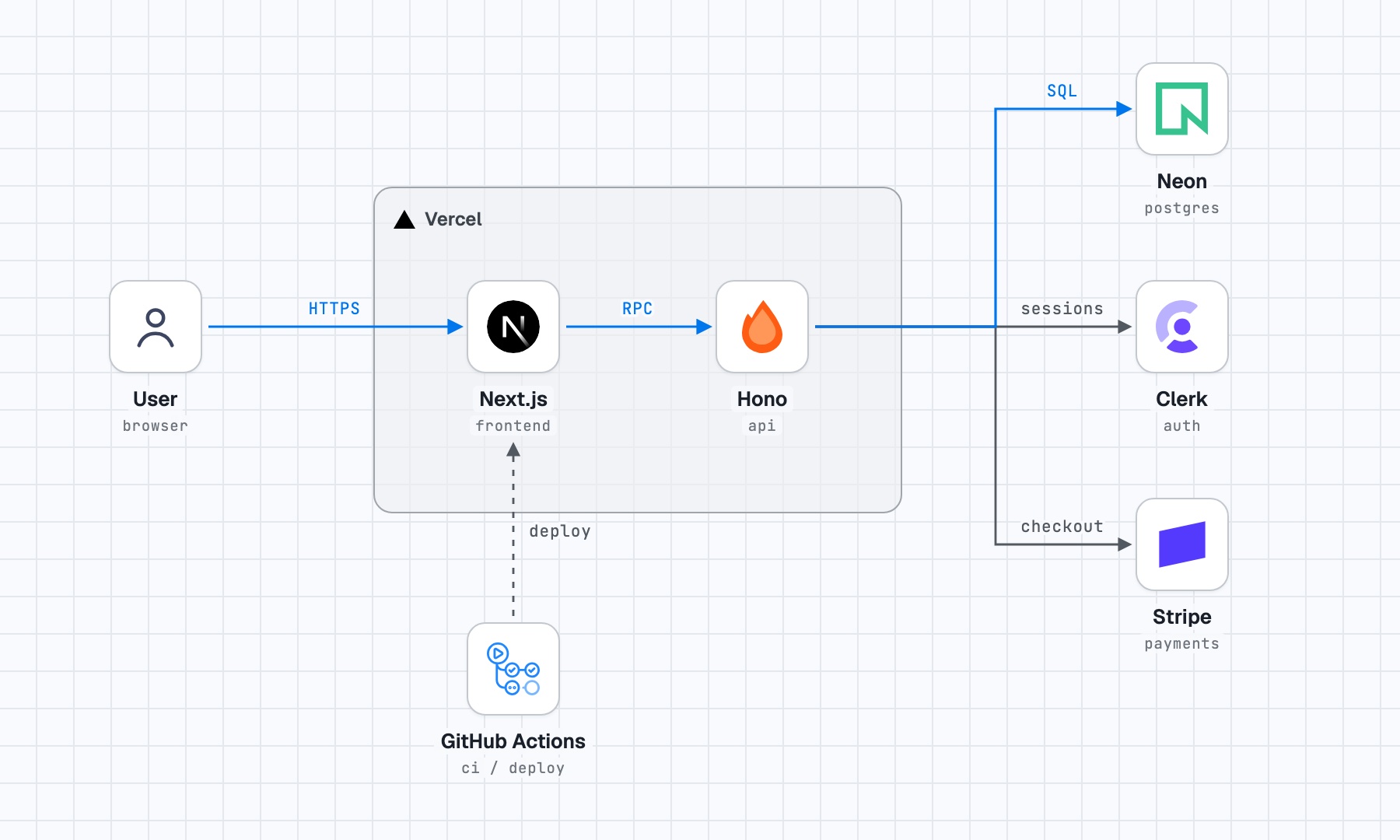
The sentence was the example from the project's README:
Next.js and a Hono API on Vercel. Postgres on Neon, auth with Clerk, payments with Stripe. GitHub Actions deploys.
The tool is stack-diagram, an open-source skill (MIT) for Claude Code, Codex and Cursor. It went up on 1 November, and the next day it already had more than 800 stars on GitHub. One command adds it to a project:
npx skills add caru-ini/stack-diagram
How it works
- It downloads each brand's official logo file, and skips redrawn icon sets on purpose.
- The agent places every box and arrow itself, in pixel coordinates, following a spacing spec that keeps lines off the labels.
- It all goes into one HTML file with no outside dependencies, and headless Chromium screenshots it in light and dark.
- The agent then looks at the PNG and fixes anything that overlaps before handing it over.
What went wrong in my test
- The first render drew the Vercel box in orange, the template's default color. The second render fixed it.
- I tried a second stack with whisper.cpp and Piper. Neither is in the three logo libraries it checks, so I had to find the files myself.
- One of them was a JPEG on a URL that doesn't end in .jpg, and the logo script didn't pick it up. I added it by hand.
Before you install it
- At the end, the skill offers to post your diagram to a public gallery. It asks twice before sending anything. Look for internal service names in the picture before you say yes.
- The skills CLI sends anonymous usage data unless you set
DISABLE_TELEMETRY=1(details in its README).
The part I liked most: it checks its own picture before showing it to you.
What do you use for architecture diagrams today?